


Lexmark 24B6020 EcoTone Reman Black Toner – 35,000 Pages
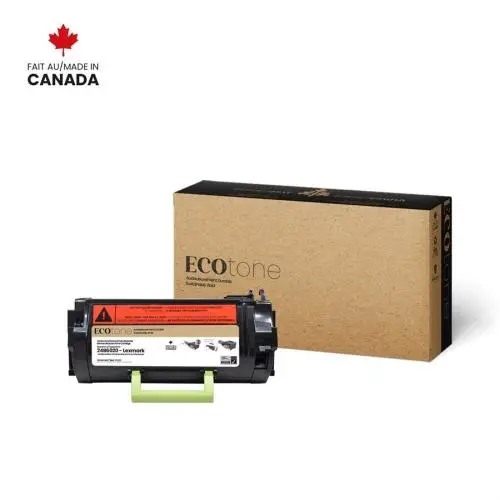


The Lexmark 24B6020 EcoTone remanufactured black toner cartridge is designed to deliver reliable, quality printing with compatible Lexmark printers.
With a yield of up to 35,000 pages, this cartridge is suitable for offices, businesses and high-volume professional printing environments.
Remanufactured in Canada, it provides a cost-effective alternative that promotes cartridge reuse.
Lexmark 24B6020 Toner Specifications
- Page yield: up to 35,000 pages
- OEM reference: Lexmark 24B6020
- Colour: black
- Type: EcoTone cartridge remanufactured in Canada
- Technology: monochrome laser printing
Why Choose the EcoTone 24B6020 Remanufactured Toner?
- High page yield of up to 35,000 pages.
- Suitable for high-volume professional printing environments.
- Sharp black printing for business documents, invoices and reports.
- EcoTone cartridge remanufactured in Canada.
- Cost-effective alternative that promotes cartridge reuse.
- Free technical support from André Ink.
- Shipping throughout Quebec and Canada.
Lexmark 24B6020 Toner Page Yield
The EcoTone 24B6020 remanufactured toner cartridge offers a nominal yield of up to 35,000 pages.
Actual page yield may vary depending on document coverage, printer settings and operating conditions.
This capacity is suitable for businesses that regularly print large volumes of professional documents.
Installing and Replacing the 24B6020 Toner
Before installation, remove all protective shipping materials from the remanufactured toner cartridge.
Install the cartridge according to your Lexmark printer manufacturer's instructions.
If the printer does not recognize the cartridge or displays an error code, contact André Ink for free technical support.
Lexmark Printers Compatible with 24B6020
This EcoTone 24B6020 remanufactured black toner cartridge is intended for the following Lexmark printers:
Always verify your exact printer model number before ordering.
Order Your Lexmark 24B6020 Toner from André Ink
Choose the EcoTone 24B6020 remanufactured black toner cartridge for high-volume professional printing while promoting cartridge reuse.
This product is available by special order, subject to supplier availability. André Ink provides shipping throughout Quebec and Canada, along with free technical support.
Lexmark 24B6020 Error Codes and Troubleshooting
Lexmark 24B6020 Error Code Guide
This troubleshooting guide provides a reference for common error codes that may appear on printers compatible with the Lexmark 24B6020 black toner cartridge, including Lexmark XM7100 Series printers and certain XM7200 Series models. Always use the complete error code displayed by the printer to identify the problem and determine the appropriate troubleshooting steps.
Error Code Reference Table
| Code | Meaning | Probable Cause | Check / Solution | Related Part |
|---|---|---|---|---|
| 31.40–31.46 | Toner cartridge missing or not recognized | Cartridge incorrectly installed, contact or detection problem | Remove and reinstall the toner cartridge. Check the contacts and test with a known-good compatible cartridge. | Toner / contacts |
| 31.60–31.66 | Imaging unit missing or not recognized | Imaging unit incorrectly installed or detection problem | Remove and reinstall the imaging unit. Check its installation and electrical contacts. | Imaging unit / drum |
| 31.80–31.85 | Fuser missing or not recognized | Fuser incorrectly installed, connection or detection problem | Turn the printer off and allow the fuser to cool. Check its installation and electrical connections. | Fuser |
| 32.xx | Unsupported supply | Incorrect or incompatible supply | Verify the supply part number and compatibility with the printer model. | Toner / imaging unit |
| 33.xx | Non-Lexmark supply detected | Compatible, remanufactured or incorrectly identified supply | Check the installed supply. If necessary, test with a known-good supply. | Toner / imaging unit |
| 34 | Short paper | Incorrect paper size or tray configuration | Check the paper size, tray guides and printer paper settings. | Paper / tray |
| 35 / 37 / 38 | Insufficient memory or memory full | Print job is too large or complex | Reduce the print resolution or document complexity and resend the print job. | Memory |
| 39 | Complex page | The page requires excessive printer resources | Reduce the resolution, graphics or document complexity. | Memory |
| 42.xx | Supply region mismatch | Cartridge intended for a different region | Verify the region and part number of the installed toner cartridge. | Toner cartridge |
| 80.xx | Maintenance required | Printer maintenance interval reached | Inspect the maintenance kit and replace the required components when necessary. | Maintenance kit |
| 84.xx | Imaging unit problem or end of life | Imaging unit worn or replacement required | Check the imaging unit condition and replace it when required. | Imaging unit / drum |
| 111.xx | Printing system error | Printhead, connection or electronic problem | Restart the printer. If the error returns, check the connections and diagnose the printing system. | Printhead / electronics |
| 121.xx | Fuser error | Temperature, heating element, thermistor or power problem | Turn the printer off and allow the fuser to cool before checking the fuser and its electrical connections. | Fuser |
| 126.xx | Power supply error | Power supply or electrical connection problem | Check the electrical connectors and printer power supply. | Power supply / LVPS |
| 172.xx | Fan error | Fan blocked, disconnected or defective | Check that the fan turns freely and inspect the connector and wiring. | Fan |
| 200.xx | Paper jam in the input area | Paper, pickup roller or sensor problem | Remove the jammed paper and inspect the pickup rollers and sensors. | Pickup roller / sensor |
| 201.xx | Paper jam in the paper path | Paper, paper fragment or sensor problem | Inspect the complete paper path and remove any remaining paper fragments. | Paper path / sensors |
| 202.xx | Paper jam near the fuser or output area | Paper trapped near the fuser or detection problem | Allow the fuser to cool, remove the jammed paper and inspect the output area. | Fuser / output |
| 23x.xx | Paper jam in the duplex path | Paper, roller or duplex sensor problem | Inspect the duplex paper path and remove any paper or paper fragments. | Duplex / sensors |
| 24x.xx | Tray feed problem or paper jam | Pickup roller, separator, paper or sensor problem | Check the indicated tray, paper guides, feed rollers and sensors. | Tray / pickup roller |
| 900.xx | System error | Firmware, print job, installed option or printer electronics | Restart the printer. If the error returns, record the complete sub-code for further diagnosis. | Firmware / system board |
Error After Installing a Lexmark 24B6020 Toner Cartridge
If an error appears after installing a Lexmark 24B6020 toner cartridge, remove and reinstall the cartridge. Make sure the cartridge is properly seated and inspect the contact points. If the problem continues, record the complete error code displayed by the printer before replacing a supply or printer component.
Important: codes containing “xx” or “x” represent an error-code family. The complete sub-code displayed by the printer provides more precise diagnostic information.
- Brand: EcoTone
- Product Code: RLEX24B6020
- MPN: RLEX24B6020
- Availability: In Stock
-
139.99$
Complementary products
- 0 or more - 0%
Last update on 13.11.2026
Tags: 24B6020, 24B-6020, 24B 6020