


Lexmark 24B6015 Remanufactured Black Toner EcoTone – 35,000 Pages
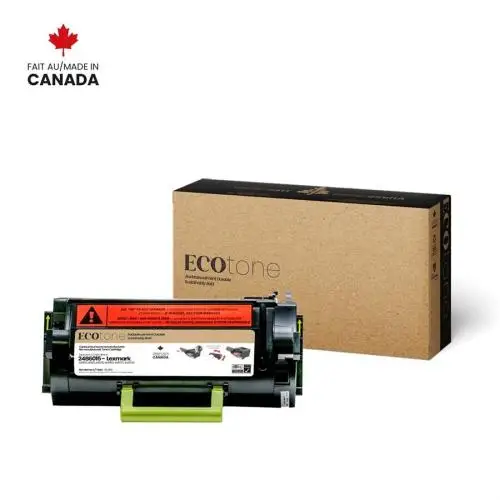


The Lexmark 24B6015 remanufactured black EcoTone toner is an extra-high-yield cartridge designed for compatible Lexmark monochrome laser printers and multifunction devices.
With a yield of up to approximately 35,000 pages, this cartridge is particularly well suited for businesses and high-volume printing environments.
This remanufactured EcoTone cartridge provides an economical and more responsible solution by extending the useful life of an existing cartridge while producing sharp black text and professional documents.
Lexmark 24B6015 Remanufactured Black Toner Features
- Yield: up to approximately 35,000 pages.
- OEM Reference: 24B6015.
- SKU: PLLE24B6015.
- EcoTone Reference: RLEX-B6015.
- Colour: Black.
- Type: extra-high-yield remanufactured toner cartridge.
- Technology: monochrome laser printing.
- Reference yield: up to approximately 35,000 pages.
Why Choose Our Remanufactured Lexmark 24B6015 Toner?
- Extra-high yield of approximately 35,000 pages to reduce toner replacement frequency.
- Designed for high-volume printing in businesses and professional workgroups.
- Sharp, professional black text for reports, invoices, forms and office documents.
- Remanufactured EcoTone cartridge that extends the useful life of an existing cartridge.
- A more responsible alternative that promotes cartridge reuse.
- Economical solution to help control printing costs.
- Free André Ink technical support for installation and troubleshooting.
- Fast shipping throughout Quebec and Canada.
Lexmark 24B6015 Toner Yield
The remanufactured Lexmark 24B6015 EcoTone toner provides a yield of up to approximately 35,000 pages.
This extra-high yield is particularly well suited for businesses and work environments that regularly print large volumes of documents.
Actual page yield may vary depending on document content, toner coverage, paper size, print settings and operating conditions.
Lexmark 24B6015 Toner Installation and Replacement
Important: before installing your new 24B6015 cartridge, remove all protective shipping materials according to the instructions supplied with the product.
Install the cartridge in your Lexmark printer according to the manufacturer's instructions.
If a toner replacement message remains displayed or you experience a printing problem, contact André Ink for free assistance.
Printers Compatible with Lexmark 24B6015 Toner
The Lexmark 24B6015 remanufactured black EcoTone toner is compatible with the following Lexmark printers and multifunction devices:
Always verify your exact printer model before ordering.
Order Your Remanufactured Lexmark 24B6015 Toner
Choose the Lexmark 24B6015 remanufactured black EcoTone toner for professional high-volume printing with a yield of up to approximately 35,000 pages.
André Ink provides fast shipping throughout Quebec and Canada along with free technical support for installation and troubleshooting.
Lexmark 24B6015 Error Codes and Troubleshooting
Lexmark 24B6015 Error Code Guide
This help guide provides a reference for common error codes that may appear on printers compatible with the Lexmark 24B6015 black toner cartridge. Use the complete error code displayed by the printer to identify the probable cause and the recommended troubleshooting steps.
Error Code Reference Table
| Code | Meaning | Probable Cause | Check / Solution | Related Part |
|---|---|---|---|---|
| 31.40–31.46 | Toner cartridge missing or not recognized | Cartridge incorrectly installed, contact or detection problem | Remove and reinstall the toner cartridge. Check the contacts and test with a known-good compatible cartridge. | Toner / contacts |
| 31.60–31.66 | Imaging unit missing or not recognized | Imaging unit incorrectly installed or detection problem | Remove and reinstall the imaging unit. Check the contacts and test with a known-good unit if available. | Imaging unit / drum |
| 31.80–31.85 | Fuser missing or not recognized | Fuser incorrectly installed, connection or detection problem | Turn the printer off and allow the fuser to cool. Check its installation and electrical connections. | Fuser |
| 32.xx | Unsupported supply | Incorrect or incompatible supply | Verify the supply part number and compatibility with the printer. | Toner / imaging unit |
| 33.xx | Non-Lexmark supply detected | Compatible, remanufactured or incorrectly identified supply | Check the installed supply and test with a known-good supply if necessary. | Toner / imaging unit |
| 34 | Short paper | Incorrect paper size or tray configuration | Check the paper size, tray guides and paper settings in the printer. | Paper / tray |
| 35 / 37 / 38 | Insufficient memory or memory full | Print job is too large or complex | Reduce the print resolution or document complexity and resend the print job. | Memory |
| 39 | Complex page | The page requires excessive printer resources | Reduce resolution, graphics or document complexity. | Memory |
| 42.xx | Supply region mismatch | Cartridge intended for a different region | Verify the region and part number of the installed toner cartridge. | Toner cartridge |
| 80.xx | Maintenance required | Printer maintenance interval reached | Inspect the maintenance kit and replace the required components. | Maintenance kit |
| 84.xx | Imaging unit problem or end of life | Imaging unit is worn or replacement is required | Check the imaging unit and replace it when necessary. | Imaging unit / drum |
| 111.xx | Printing system error | Printhead, connection or electronic problem | Restart the printer. If the error returns, check the connections and diagnose the printing system. | Printhead / electronics |
| 121.xx | Fuser error | Temperature, heating element, thermistor or power problem | Turn the printer off and allow the fuser to cool before checking the fuser and its electrical connections. | Fuser |
| 126.xx | Power supply error | Power supply or electrical connection problem | Check the electrical connectors and printer power supply. | Power supply / LVPS |
| 172.xx | Fan error | Fan blocked, disconnected or defective | Check that the fan turns freely and inspect the connector and wiring. | Fan |
| 200.xx | Paper jam in the input area | Paper, pickup roller or sensor problem | Remove the jammed paper and inspect the pickup rollers and sensors. | Pickup roller / sensor |
| 201.xx | Paper jam in the paper path | Paper, paper fragment or sensor problem | Inspect the complete paper path and remove any remaining paper fragments. | Paper path / sensors |
| 202.xx | Paper jam near the fuser or output area | Paper trapped near the fuser or detection problem | Allow the fuser to cool, remove the jammed paper and inspect the output area. | Fuser / output |
| 23x.xx | Paper jam in the duplex path | Paper, roller or duplex sensor problem | Inspect the duplex paper path and remove any paper or fragments. | Duplex / sensors |
| 24x.xx | Tray feed problem or paper jam | Pickup roller, separator, paper or sensor problem | Check the indicated tray, paper guides, feed rollers and sensors. | Tray / pickup roller |
| 900.xx | System error | Firmware, print job or printer electronics | Restart the printer. If the error returns, record the complete sub-code for further diagnosis. | Firmware / system board |
Error After Installing a Lexmark 24B6015 Toner Cartridge
If an error appears after installing a Lexmark 24B6015 toner cartridge, remove and reinstall the cartridge. Make sure it is properly seated and inspect the contact points. Always record the complete error code displayed by the printer before replacing a component.
Important: codes containing “xx” or “x” represent an error-code family. The complete sub-code displayed by the printer provides more precise diagnostic information.
- Brand: EcoTone
- Product Code: PLLE24B6015
- MPN: RLEX-B6015
- Availability: In Stock
-
179.95$
-
- 2 or more 188.95$
Last update on 02.11.2026
Tags: 24B6015, RLEXB6015, PLLE24B6015