


Brother DR-420 Compatible Imaging Drum – 12,000 Pages
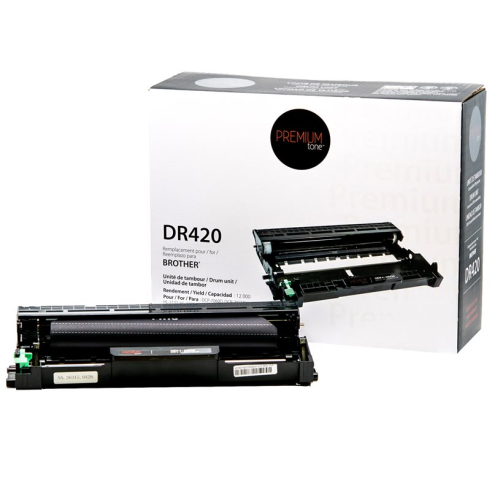


Is your Brother printer displaying a message indicating that the drum needs to be replaced? The Brother DR-420 compatible Premium Tone imaging drum is designed to deliver sharp, consistent and professional print quality while helping reduce printer maintenance costs.
With an estimated life of up to approximately 12,000 pages, this imaging drum is an excellent solution for businesses, offices and home users.
The DR-420 drum is separate from the toner cartridge. It works with Brother TN-420 and TN-450 toner cartridges within this same family of compatible printers.
Brother DR-420 Compatible Imaging Drum Features
- Estimated life: up to approximately 12,000 pages.
- OEM reference: DR420 / DR-420.
- Premium Tone SKU: NCBRDR420-OP.
- Type: compatible imaging drum / drum unit.
- Technology: monochrome laser printing.
- Associated toner cartridges: TN-420 / TN-450 depending on printer model.
Why Choose Our DR-420 Compatible Imaging Drum?
- Up to approximately 12,000 pages depending on operating conditions.
- Consistent print quality for reports, invoices, letters and professional documents.
- Excellent value to help extend the useful life of your Brother printer.
- Premium Tone NCBRDR420-OP, a compatible alternative to the Brother DR420.
- Free André Ink technical support for installation, replacement and drum-counter reset assistance.
- Fast shipping across Canada.
DR-420 Drum Life
The Brother DR-420 has an estimated life of up to approximately 12,000 pages.
Actual drum life may vary depending on the number of pages per print job, temperature, humidity, paper type, toner usage and other operating conditions.
Brother Printers Compatible with DR-420
The Brother DR-420 compatible Premium Tone imaging drum is suitable for the following Brother printers:
Always verify your printer's exact model number before ordering.
Order Your Brother DR-420 Compatible Imaging Drum
Choose a reliable and economical replacement with our Brother DR-420 compatible Premium Tone imaging drum.
You also receive free André Ink technical support, including assistance with drum installation and drum-counter reset, plus fast shipping across Canada.
How to Reset the Brother DR-420 Drum
After replacing your Brother DR-420 drum unit, you will need to reset the drum counter so the printer correctly recognizes the new drum unit.
The reset procedure varies depending on your Brother printer model. Choose the method below that corresponds to your printer.
Option 1: Brother MFC Printers
This procedure applies to Brother models using the DR-420 drum, including the MFC-7360N, MFC-7460DN and MFC-7860DW.
- Open the front cover of the printer.
- Press the Clear or Back button.
- The display should show “Replace Drum?”.
- Press 1 to confirm the drum counter reset.
- When “Accepted” appears on the display, close the front cover.
The DR-420 drum counter should now be reset.
Option 2: Brother DCP and HL Printers With a Display
This procedure applies to Brother models using the DR-420 drum, including the DCP-7060D, DCP-7065DN and HL-2280DW.
- Open the front cover.
- Press the Clear or Back button.
- The display should show “Replace Drum?”.
- Press the Up Arrow (▲) to confirm the reset.
- Once the reset has been confirmed, close the front cover.
The drum counter should now be reset.
Option 3: Brother HL Printers Without a Display
This procedure applies to Brother HL printers using the DR-420 drum, including the HL-2240 and HL-2270DW.
- Open the front cover.
- Press and hold the Go button for approximately 4 seconds.
- Release the button when all the LEDs light up.
- Close the front cover.
The Drum LED should now turn off and the DR-420 drum counter should be reset.
Does the “Replace Drum” Message Still Appear?
If the Drum light or “Replace Drum” message remains displayed after completing the procedure, make sure the DR-420 drum unit is properly installed, then repeat the reset procedure.
Important: resetting the drum counter does not repair a worn or defective drum unit. The counter should normally be reset when installing a new drum unit.
Need Help With Your Brother DR-420 Drum?
Not sure which reset procedure to use or whether the DR-420 is compatible with your printer? André Ink can help you identify the correct drum unit and the appropriate reset procedure for your Brother printer.
Last update on 06.10.2026
Product of the same family
Brother TN-450 Compatible Black Toner Premium Tone – 2,600 Pages
Looking for a reliable high-yield black toner cartridge for your Brother printer? The Brother TN..
39.95$
Brother TN-450 Compatible Black Toner 3-Pack Premium Tone – 7,800 Pages
Print regularly with your Brother printer and want to reduce how often you reorder toner? The Br..
109.95$
Tags: NCBRTN450-OP, TN450, TN-450, TN 450, Brother TN450, Brother TN-450, Brother TN 450, toner TN450, toner TN-450, cartouche TN450, toner noir Brother, DCP7060D, DCP-7060D, DCP7065DN, DCP-7065DN, HL2220, HL-2220, HL2230, HL-2230, HL2240, HL-2240, HL2240D, HL-2240D, HL2270DW, HL-2270DW, HL2275DW, HL-2275DW, HL2280DW, HL-2280DW, IntelliFAX2840, IntelliFAX-2840, IntelliFAX2940, IntelliFAX-2940, MFC7240, MFC-7240, MFC7360N, MFC-7360N, MFC7365DN, MFC-7365DN, MFC7460DN, MFC-7460DN, MFC7860DW, MFC-7860DW