


Brother TN-229XLC Compatible Cyan Toner Fuzion – 2,300 Pages
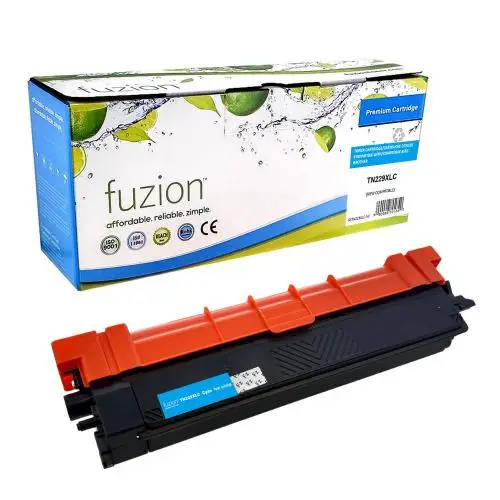


The Brother TN-229XLC compatible cyan Fuzion toner is designed for Brother colour laser printers and multifunction devices using the TN229XLC toner cartridge.
With a yield of up to approximately 2,300 pages, this high-yield cartridge provides an economical solution for colour printing requirements at home, in the office or in a business environment.
It helps produce sharp and consistent cyan colour for graphics, presentations and professional documents while providing a compatible replacement solution for your Brother printer.
Features of the Brother TN-229XLC Compatible Cyan Toner
- Yield: up to approximately 2,300 pages.
- OEM Reference: TN229XLC.
- Fuzion SKU: GSTN229XLC-NC.
- Colour: Cyan.
- Type: new compatible toner cartridge.
- Technology: colour laser printing.
- Reference yield: approximately 2,300 Letter/A4 pages according to ISO/IEC 19798.
Why Choose Our Compatible TN-229XLC Toner?
- Up to approximately 2,300 pages for your colour printing requirements.
- High-yield capacity helps reduce cartridge replacement frequency.
- Sharp and consistent cyan colour for graphics, presentations and documents.
- Professional printing with compatible Brother colour laser devices.
- Economical solution to help control printing costs.
- Compatible Fuzion cartridge designed for the Brother devices listed below.
- Free André Ink technical support for installation and troubleshooting.
- Fast shipping throughout Quebec and Canada.
Brother TN-229XLC Toner Yield
The Brother TN-229XLC compatible Fuzion toner provides a yield of up to approximately 2,300 pages.
ISO/IEC 19798 is the reference method used to measure toner cartridge yield for colour laser printers.
Actual page yield may vary depending on document content, toner coverage, paper size, print settings and operating conditions.
The ISO/IEC 19798 reference describes the method used to establish reference page yield and does not constitute independent certification of this compatible Fuzion cartridge.
TN-229XLC Toner Installation and Replacement
Important: before installing your new TN-229XLC cartridge, remove all protective shipping materials according to the instructions supplied with the product.
Install the cartridge in your Brother printer by following the manufacturer's instructions.
If a toner replacement message remains displayed or you experience printing problems, contact André Ink for free assistance.
Printers Compatible with Brother TN-229XLC Toner
The Brother TN-229XLC compatible cyan Fuzion toner is suitable for the following Brother printers and multifunction devices:
Please verify your exact printer model before ordering.
Order Your Brother TN-229XLC Compatible Toner
Choose the Brother TN-229XLC compatible cyan Fuzion toner for sharp, professional colour printing with a yield of up to approximately 2,300 pages.
André Ink provides shipping throughout Quebec and Canada. You also receive free André Ink technical support for installation and troubleshooting.
Subject: TN-223 / TN-227 / TN-229 / TN-229XL
Is your printer producing prints that are increasingly faint, blurry, uneven, or lacking in sharpness?
Here’s why — and how to fix the issue.
 To improve the quality and definition of prints, the toner formulation was recently updated. The original carbon/polymer ratio of 7/3 was modified, and new additives were introduced into the ink composition. As a result, the electrostatic charge of the toner particles has increased. This has led to the buildup of micro-dust on the LED print heads, which can potentially affect the sharpness and accuracy of the prints.
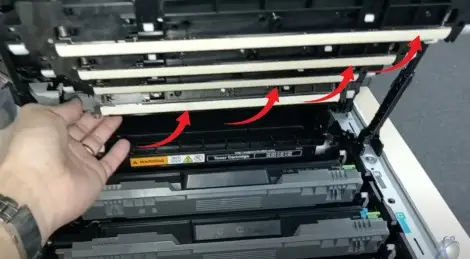
Clean the LED Heads
If you are experiencing print quality issues, clean the LED heads as follows: :
- Press and hold the power button
 to turn off the device.
- Open the top cover until it locks into the open position.
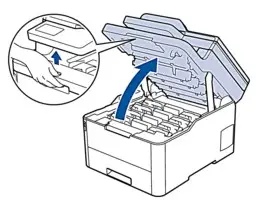
- Wipe each LED head window (1) with a dry, soft, lint-free cloth. Do not touch the windows with your fingers.
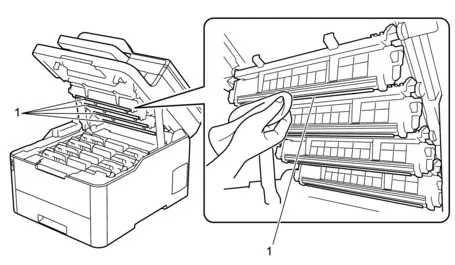
- Close the top cover of the device.
- Press the power button to turn the device back on.
(Note: Depending on the level of dust buildup on the LEDs, you may use screen-safe cleaning products or diluted isopropyl alcohol.)
- Brand: Fuzion Toner
- Product Code: FUZIONBRTN229XLCY
- MPN: GSTN229XLC-NC
- Availability: In Stock
-
69.95$
Last update on 21.10.2026
Product of the same family

Brother TN-229XLBK Compatible Black Toner Fuzion – 3,000 Pages
The Brother TN-229XLBK compatible black Fuzion toner is designed for Brother colour laser printe..
69.95$
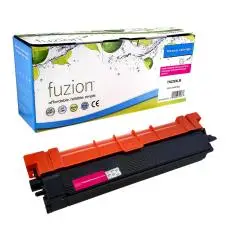
Brother TN-229XLM Compatible Magenta Toner Fuzion – 2,300 Pages
The Brother TN-229XLM compatible magenta Fuzion toner is designed for Brother colour laser print..
69.95$
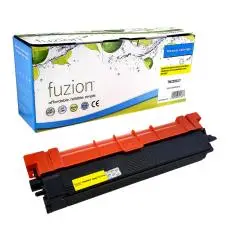
Brother TN-229XLY Compatible Yellow Toner Fuzion – 2,300 Pages
The Brother TN-229XLY compatible yellow Fuzion toner is designed for Brother colour laser printe..
69.95$
Tags: TN229XLC, TN-229XLC, TN 229XLC
Our customers are everywhere in Canada... Learn more
