


Brother LC-75BK x2 black compatible Fuzion – 1,200 pages
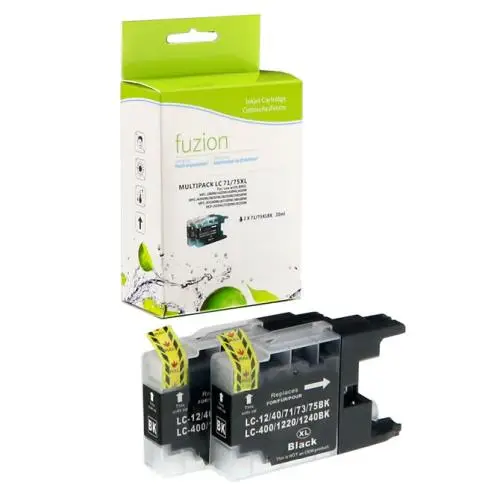


Brother LC-75BK Black Compatible Ink Cartridges by Fuzion - 2-Pack
The Brother LC-75BK black compatible ink cartridge 2-pack by Fuzion is an economical solution for everyday home and office printing.
This package includes two high-yield XL black ink cartridges designed as alternatives to the original Brother LC75BK / LC75BKS. Each cartridge offers an advertised yield of 600 pages, for a combined yield of 1,200 pages across both cartridges.
Brother LC-75BK 2-Pack Specifications
- Brand: Fuzion
- Product code: IJLC752PKS
- Original Brother reference: LC75BK / LC75BKS / LC752PKS
- Colour: Black
- Type: Compatible inkjet cartridges
- Contents: 2 black cartridges
- Format / Yield: High-yield XL / 2 × 600 pages, or 1,200 pages combined according to ISO/IEC 24711
Why Choose Our Compatible LC-75BK Black 2-Pack?
- Savings: Two compatible ink cartridges in one economical package.
- High-yield XL format: An advertised yield of 600 pages per cartridge.
- Quality printing: Suitable for text documents, office forms and everyday printing.
- Convenient spare: Keep a second cartridge ready when the first needs replacing.
- Personalized support: André Ink helps customers choose cartridges and troubleshoot printing problems.
Compatible Brother Printers for LC-75BK
This 2-pack is intended for Brother printers accepting LC75BK black ink cartridges. The models below are listed by the supplier and correspond to Brother's LC75BK printer compatibility information.
Brother MFC Series
Brother MFC-J280W
Brother MFC-J425W
Brother MFC-J430W
Brother MFC-J435W
Brother MFC-J5910DW
Brother MFC-J625DW
Brother MFC-J6510DW
Brother MFC-J6710DW
Brother MFC-J6910DW
Brother MFC-J825DW
Brother MFC-J835DW
Page Yield and Printing Costs
Each Fuzion LC-75BK black cartridge has an advertised yield of 600 pages, for a combined total of 1,200 pages across both cartridges. Actual yield varies depending on document content, ink coverage and usage conditions.
Compare your printing expenses with our real cartridge cost calculator.
Brother Print Head Cleaning and Maintenance
Missing lines, faded printing or a missing colour? Visit the Cleaning and Maintenance tab on this product page for print quality checks and cleaning instructions appropriate for your Brother printer.
Order Your Brother LC-75BK Black 2-Pack from André Ink
Choose this economical Fuzion compatible 2-pack and enjoy personalized service from André Ink, with delivery throughout Quebec.
Brother LC71 and LC75 Ink Cartridge Cleaning and Maintenance
How to Clean the Brother LC71 and LC75 Print Head
Brother printers using LC71 and LC75 ink cartridges have a built-in print head cleaning function.
Button-Controlled Printers
MENU → INK → CLEANING
- Turn on the printer.
- Press Menu.
- Use the navigation arrows to select Ink or Ink Management.
- Press OK.
- Select Cleaning.
- Press OK.
- Choose Black, Color or All, depending on the available options.
- Confirm the cleaning operation.
- Wait until the cleaning cycle is complete.
- Print a quality check sheet.
Touchscreen Printers
INK → CLEANING
- Press the Ink icon.
- Select Cleaning.
- Choose the affected colour group.
- Confirm if prompted.
- Wait until cleaning is complete.
Important: start by cleaning only the affected colour group. Print head cleaning consumes ink.
How to Print a Quality Check Sheet
Button-Controlled Printers
MENU → INK → TEST PRINT → PRINT QUALITY
- Press Menu.
- Select Ink or Ink Management.
- Press OK.
- Select Test Print.
- Press OK.
- Select Print Quality.
- Press OK.
- Press Color Start.
- Examine the four printed colour blocks.
Touchscreen Printers
INK → TEST PRINT → PRINT QUALITY
- Press the Ink icon.
- Select Test Print.
- Select Print Quality.
- Press Color Start or Start.
- Examine the printed sheet.
How to Interpret the Check Sheet
The sheet displays four colour blocks: black, cyan, magenta and yellow.
Each block should display complete lines without white gaps.
If Lines Are Missing
- Examine all four colour blocks.
- When the printer asks whether print quality is acceptable, select No if lines are missing.
- Indicate whether black or the colour blocks have defects.
- Confirm cleaning when prompted.
- Wait until cleaning is complete.
- Print another quality check sheet.
- Compare the results.
Expected result: all four colour blocks should be complete and uniform.
What If a Colour Is Still Missing?
If a colour remains missing after the first cleaning, check that the cartridge is correctly installed.
- Perform one cleaning cycle.
- Print a quality check sheet.
- If print quality remains poor, repeat the procedure according to the printer instructions.
- Compare the results after each cleaning cycle.
- If there is no improvement after five cycles, stop cleaning and request technical assistance.
Warning: Brother recommends no more than five cleaning cycles during this troubleshooting procedure. Repeated cleaning consumes ink.
Brother LC71 and LC75 Ink Cartridges
Brother LC71 – Standard Yield
- LC71BK: black – approximately 300 pages.
- LC71C: cyan – approximately 300 pages.
- LC71M: magenta – approximately 300 pages.
- LC71Y: yellow – approximately 300 pages.
Brother LC75 – High Yield
- LC75BK: black – approximately 600 pages.
- LC75C: cyan – approximately 600 pages.
- LC75M: magenta – approximately 600 pages.
- LC75Y: yellow – approximately 600 pages.
Page yields are approximate and based on ISO/IEC 24711.
What Is the Difference Between LC71 and LC75?
LC75 cartridges are the high-yield versions of LC71 cartridges for printers supporting both series.
LC71 cartridges yield approximately 300 pages each, while LC75 cartridges yield approximately 600 pages each.
Advantage: LC75 cartridges provide approximately twice the page yield before replacement.
Compatible Brother Printers
Printers Compatible with Both LC71 and LC75
- Brother MFC-J280W
- Brother MFC-J425W
- Brother MFC-J430W
- Brother MFC-J435W
- Brother MFC-J625DW
- Brother MFC-J825DW
- Brother MFC-J835DW
Printers Compatible with LC75 Only
- Brother MFC-J5910DW
- Brother MFC-J6510DW
- Brother MFC-J6710DW
- Brother MFC-J6910DW
Important: according to Brother's official compatibility chart, these four additional models use LC75 and LC79 cartridges, not LC71.
Why Is One Colour Not Printing?
- Clogged print head nozzles.
- An empty or nearly empty cartridge.
- Incorrect cartridge installation.
- A cartridge recognition problem.
- The printer remaining unused for an extended period.
- A worn or defective print head.
Start by printing a quality check sheet to identify the affected colour.
How to Fix Blurry or Misaligned Printing
Print Head Alignment
MENU → INK → TEST PRINT → ALIGNMENT
On touchscreen models, select Ink → Test Print → Alignment.
- Open the Ink menu.
- Select Test Print.
- Select Alignment.
- Press Black Start, Color Start or Start.
- The printer prints an alignment check sheet.
- Examine patterns A, B, C and D.
- For each pattern, select the number from 1 to 9 with the fewest visible vertical stripes.
- Confirm all four selections.
- Press Stop/Exit.
- Print another document to verify the result.
What If Cleaning Does Not Work?
- Check the ink levels.
- Make sure all cartridges are installed correctly.
- Verify that the printer recognizes the cartridges.
- Identify the affected colour.
- Avoid repeated cleaning without improvement.
- Never touch the print head directly.
- Do not use alcohol or solvents on the print head.
- If the problem persists, request technical assistance.
Frequently Asked Questions
How Do I Clean a Brother LC71 or LC75 Printer?
Open Menu, select Ink, then Cleaning. Choose the affected colour group and confirm.
Are LC71 and LC75 Cartridges Interchangeable?
Yes, in the seven Brother printers supporting both series. However, certain wide-format models support LC75 and LC79 only.
Why Is My Brother Printer Not Printing Cyan?
The cyan nozzles may be clogged. The cartridge may also be empty, incorrectly installed or not recognized.
Should I Replace a Cartridge When a Colour Is Missing?
Not necessarily. Clogged print head nozzles can cause the same problem. Start with a print quality check and cleaning.
Why Does My Printer Not Recognize the Cartridge?
Check the cartridge reference, installation and condition. A recognition problem is not necessarily caused by clogged print head nozzles.
Tips to Prevent Print Quality Problems
- Print black and colour documents regularly.
- Avoid leaving the printer unused for several weeks.
- Turn off the printer using its Power button.
- Normally leave the printer plugged in so automatic maintenance can operate.
- Keep replacement cartridges sealed until needed.
- Avoid unnecessary cleaning cycles.
André Ink Tip
A missing colour does not automatically mean your Brother LC71 or LC75 cartridge is defective. Before replacing it, print a quality check sheet and use your printer's built-in cleaning procedure.
Need Help?
The André Ink team can help identify cartridge, recognition and print quality problems with your Brother printer.
Note: Menu names may vary depending on the printer model and selected language.
- Brand: Fuzion ink
- Product Code: FUZIONBRLC75BKX2
- MPN: IJLC752PKS
- Availability: In Stock
-
15.95$
The more you buy, the more you save
- 4 or more - 10%
Last update on 27.10.2026
Product of the same family

Brother LC-75C cyan compatible Fuzion – 600 pages
Brother LC-75C Cyan Compatible Ink Cartridge by Fuzion The Brother LC-75C cyan compatible ink..
7.95$
Brother LC-75Y yellow compatible Fuzion – 600 pages
Brother LC-75Y Yellow Compatible Ink Cartridge by Fuzion The Brother LC-75Y yellow compatible..
7.95$
Brother LC-75M magenta compatible Fuzion – 600 pages
Brother LC-75M Magenta Compatible Ink Cartridge by Fuzion The Brother LC-75M magenta compatib..
7.95$
Brother LC-75 4-colour compatible Fuzion – 600 pages
Brother LC-75 XL Compatible Ink Cartridge 4-Pack by Fuzion The Brother LC-75 compatible ink c..
29.95$
Tags: LC752PKS, LC-752PKS, LC 752PKS, LC75BK, LC-75BK, LC 75BK, LC75BKS, LC-75BKS
Our customers are everywhere in Canada... Learn more
