


Brother LC-402XLC cyan compatible Fuzion – 1500 pages
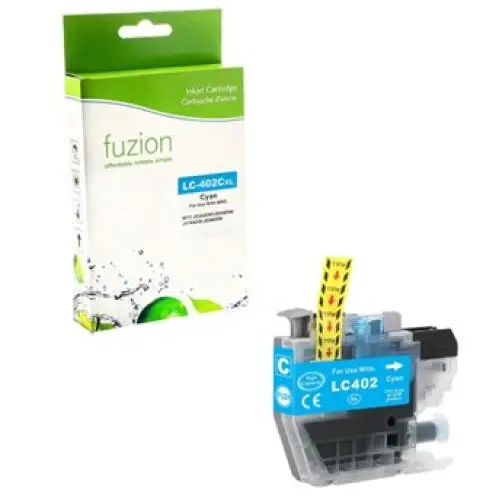


Brother LC-402XLC cyan compatible Fuzion ink cartridge
The Brother LC-402XLC cyan compatible Fuzion ink cartridge provides an economical solution for everyday colour printing at home or in the office with compatible Brother printers.
Designed to replace the original Brother LC402XLCS cartridge, this high-yield ink cartridge offers an advertised yield of 1,500 pages. It is suitable for colour documents, graphics, presentations and professional printing while helping control printing costs.
Brother LC-402XLC Cartridge Specifications
- Brand: Fuzion
- Product Code: IJLC402XLC
- Original Brother Reference: LC402XLCS
- Colour: Cyan
- Type: Compatible inkjet cartridge
- Contents: 1 cyan cartridge
- Format / Yield: XL / 1,500 pages according to ISO/IEC 24711
Benefits of Our Compatible LC-402XLC Cartridge
- Savings: An affordable replacement solution for original Brother cartridges.
- High yield: Up to 1,500 advertised pages to reduce cartridge replacements.
- Versatile printing: Suitable for colour documents, graphics, presentations and professional printing.
- Personalized service: André Ink helps you choose the right cartridges and troubleshoot your printers.
Brother Printers Compatible with LC-402XLC
According to the supplier's list, this cartridge is intended for the Brother printers below. Check the consumable reference specified for your device before ordering.
Brother MFC
Brother MFC-J5340DW
Brother MFC-J6540DW
Brother MFC-J6740DW
Brother MFC-J6940DW
Page Yield and Printing Costs
The Fuzion LC-402XLC cyan cartridge offers an advertised yield of 1,500 pages. Actual yield varies depending on document content, ink coverage and usage conditions.
Estimate your savings using our real cartridge cost calculator.
Brother Printhead Cleaning and Maintenance
Is your printer showing missing lines, faded prints or poor print quality? Visit the Cleaning and Maintenance tab for checks and cleaning procedures suited to your Brother printer.
Order Your Brother LC-402XLC Cartridge from André Ink
Choose a compatible Fuzion cyan high-yield cartridge and enjoy André Ink's personalized service, with delivery throughout Quebec.
Brother LC402 and LC402XL Ink Cartridge Cleaning and Maintenance
How to Clean the Brother LC402 Print Head
On your Brother printer touchscreen:
INK → IMPROVE PRINT QUALITY → CHECK PRINT QUALITY
This procedure applies to Brother MFC-J5340DW, MFC-J6540DW, MFC-J6740DW and MFC-J6940DW printers.
Step-by-Step Instructions
- Press Ink on the touchscreen.
- Select Improve Print Quality.
- Choose Check Print Quality.
- Press Start to print the Print Quality Check Sheet.
- Examine the black, cyan, magenta and yellow blocks.
- If all lines are complete, select No.
- If lines are missing, select Yes.
- For each colour, select the numbered pattern from 1 to 4 that best matches the printed result.
- If cleaning is recommended, press Start.
- Wait until cleaning is complete.
- Print another quality check sheet when prompted.
Expected result: all four colour blocks should display complete lines without white gaps.
Manual Print Head Cleaning
To start a cleaning cycle directly:
INK → PRINT HEAD CLEANING
- Select Black only, Color only or All.
- Choose Normal, Strong or Strongest.
- Start with Normal.
- Press Start.
- Wait until cleaning is complete.
- Print another quality check sheet.
Tip: use a stronger cleaning level only when necessary.
Important: Print head cleaning consumes ink. Avoid repeated cleaning cycles without improvement.
Brother LC402 and LC402XL Ink Cartridges
LC402 – Standard Yield:
- LC402BK: black – approximately 550 pages.
- LC402C: cyan – approximately 550 pages.
- LC402M: magenta – approximately 550 pages.
- LC402Y: yellow – approximately 550 pages.
LC402XL – High Yield:
- LC402XLBK: black – approximately 3,000 pages.
- LC402XLC: cyan – approximately 1,500 pages.
- LC402XLM: magenta – approximately 1,500 pages.
- LC402XLY: yellow – approximately 1,500 pages.
Page yields are approximate and based on ISO/IEC 24711.
Compatible Brother Printers
- Brother MFC-J5340DW
- Brother MFC-J6540DW
- Brother MFC-J6740DW
- Brother MFC-J6940DW
Why Is One Colour Not Printing?
A missing colour may be caused by:
- Clogged print head nozzles.
- An empty or nearly empty cartridge.
- Incorrect cartridge installation.
- A cartridge recognition problem.
- The printer remaining unused for an extended period.
Start by printing a Print Quality Check Sheet to identify the affected colour.
How to Fix Blurry or Misaligned Printing
Print Head Alignment
Menu path:
INK → IMPROVE PRINT QUALITY → ALIGNMENT
- Complete a print quality check first.
- Open the Alignment menu.
- Press Next.
- Confirm that a print quality check has been completed.
- Select Auto or Manual.
- Choose the required paper size.
- Press Start.
- Follow the touchscreen instructions.
What If Cleaning Does Not Work?
- Check the ink levels.
- Make sure all cartridges are installed correctly.
- Verify that the printer recognizes the cartridges.
- Identify the affected colour.
- Avoid repeated cleaning without improvement.
- Never touch the print head directly.
- Do not use alcohol or solvents on the print head.
- If the problem persists, request technical assistance.
Frequently Asked Questions
Why is my Brother printer not printing cyan?
The cyan nozzles may be clogged, or the cartridge may be empty, incorrectly installed or not recognized. Start with a print quality check.
What is the difference between LC402 and LC402XL?
Standard LC402 cartridges yield approximately 550 pages. LC402XL cartridges yield approximately 3,000 pages in black and 1,500 pages per colour.
Should I replace a cartridge when a colour is missing?
Not necessarily. Clogged print head nozzles can cause the same problem. Start with the built-in print quality check and cleaning procedure.
Why does my printer not recognize the cartridge?
Check the cartridge reference, installation and condition. A recognition problem is not necessarily caused by clogged print head nozzles.
Tips to Prevent Print Quality Problems
- Print black and colour documents regularly.
- Avoid leaving the printer unused for several weeks.
- Turn off the printer using its Power button.
- Normally leave the printer plugged in so automatic maintenance can operate.
- Keep replacement cartridges sealed until needed.
- Avoid unnecessary cleaning cycles.
André Ink Tip
A missing colour does not automatically mean your LC402 or LC402XL cartridge is defective. Before replacing it, perform a print quality check and use your Brother printer's built-in cleaning procedure.
Need Help?
The André Ink team can help identify cartridge, recognition and print quality problems with your Brother printer.
Note: Menu names may vary slightly depending on the language selected on your printer.
```
- Brand: Fuzion ink
- Product Code: FUZIONBRLC402XLCY
- MPN: IJLC402XLC
- Availability: In Stock
-
19.95$
Complementary products
- 4 or more - 10%
Last update on 30.10.2026
Product of the same family
Brother LC-402XLY yellow compatible Fuzion – 1500 pages
Brother LC-402XLY yellow compatible Fuzion ink cartridge The Brother LC-402XLY yellow compati..
19.95$
Brother LC-402XLM magenta compatible Fuzion – 1500 pages
Brother LC-402XLM magenta compatible Fuzion ink cartridge The Brother LC-402XLM magenta compa..
19.95$
Brother LC-402XLBK black compatible Fuzion – 3000 pages
Brother LC-402XLBK black compatible Fuzion ink cartridge The Brother LC-402XLBK black compati..
24.95$
Tags: LC402XLC, LC-402XLC, LC 402XLC, LC402XLCS, LC-402XLCS
Our customers are everywhere in Canada... Learn more
