


Brother LC-3035Y yellow compatible Fuzion – 5000 pages
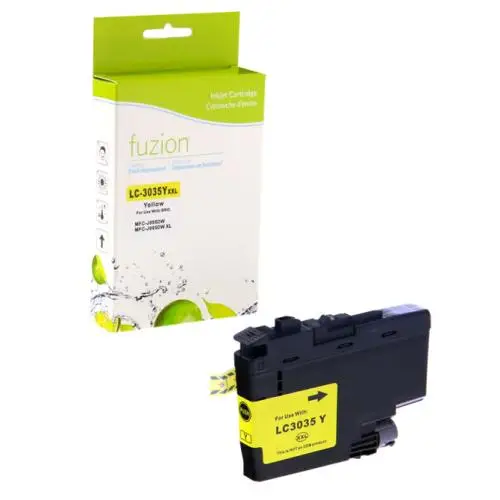


Brother LC-3035Y yellow compatible Fuzion ink cartridge
The Brother LC-3035Y yellow compatible Fuzion ink cartridge provides an economical solution for everyday colour printing at home or in the office with Brother INKvestment Tank printers.
Designed to replace the original Brother LC3035YS cartridge, this ultra high-yield ink cartridge offers an advertised yield of 5,000 pages. It is suitable for colour documents, graphics, presentations and professional printing while helping control printing costs.
Brother LC-3035Y Cartridge Specifications
- Brand: Fuzion
- Product Code: IJLC3035Y
- Original Brother Reference: LC3035YS
- Colour: Yellow
- Type: Compatible INKvestment Tank inkjet cartridge
- Contents: 1 yellow cartridge
- Format / Yield: XXL / 5,000 pages according to ISO/IEC 24711
Benefits of Our Compatible LC-3035Y Cartridge
- Savings: An affordable replacement solution for original Brother cartridges.
- Ultra high yield: Up to 5,000 advertised pages to reduce cartridge replacements.
- Versatile printing: Suitable for colour documents, graphics, presentations and professional printing.
- Personalized service: André Ink helps you choose the right cartridges and troubleshoot your printers.
Brother Printers Compatible with LC-3035Y
According to the supplier's list, this cartridge is intended for the Brother INKvestment Tank printers below. Check the consumable reference specified for your device before ordering.
Brother MFC
Brother MFC-J995DW
Brother MFC-J995DWXL
Page Yield and Printing Costs
The Fuzion LC-3035Y yellow cartridge offers an advertised yield of 5,000 pages. Actual yield varies depending on document content, ink coverage and usage conditions.
Estimate your savings using our real cartridge cost calculator.
Brother Printhead Cleaning and Maintenance
Is your printer showing missing lines, faded prints or poor print quality? Visit the Cleaning and Maintenance tab for checks and cleaning procedures suited to your Brother printer.
Order Your Brother LC-3035Y Cartridge from André Ink
Choose a compatible Fuzion yellow ultra high-yield cartridge and enjoy André Ink's personalized service, with delivery throughout Quebec.
Brother LC3035 Ink Cartridge Cleaning and Maintenance
How to Clean the Brother LC3035 Print Head
Brother MFC-J995DW and MFC-J995DW XL:
SETTINGS → MAINTENANCE → IMPROVE PRINT QUALITY → CHECK PRINT QUALITY
Brother MFC-J805DW, MFC-J805DW XL and MFC-J815DW XL:
SETTINGS → GENERAL SETUP → MAINTENANCE → IMPR. PRINTQUALITY → IMPR. PRINTQUALITY
On button-operated models, use the navigation arrows and OK button.
Step-by-Step Instructions
- Open the menu corresponding to your printer model.
- Print the Print Quality Check Sheet.
- Examine the black, cyan, magenta and yellow blocks.
- If all lines are complete, select No.
- If lines are missing, select Yes.
- For each colour, choose the numbered pattern from 1 to 4 that best matches the printed result.
- If cleaning is recommended, confirm to start the cleaning procedure.
- Wait until cleaning is complete.
- Print another quality check sheet when prompted.
Expected result: all four colour blocks should display complete lines without white gaps.
Important: Print head cleaning consumes ink. Check print quality after each cleaning cycle and avoid repeated cleaning without improvement.
Brother LC3035 Ink Cartridges
The Brother LC3035 INKvestment Tank series includes four ultra high-yield cartridges:
- LC3035BK: black – approximately 6,000 pages.
- LC3035C: cyan – approximately 5,000 pages.
- LC3035M: magenta – approximately 5,000 pages.
- LC3035Y: yellow – approximately 5,000 pages.
Page yields are approximate and based on ISO/IEC 24711.
Compatible Brother Printers
- Brother MFC-J805DW
- Brother MFC-J805DW XL
- Brother MFC-J815DW XL
- Brother MFC-J995DW
- Brother MFC-J995DW XL
Why Is One Colour Not Printing?
A missing colour may be caused by:
- Clogged print head nozzles.
- An empty or nearly empty cartridge.
- Incorrect cartridge installation.
- A cartridge recognition problem.
- The printer remaining unused for an extended period.
Always start by printing a Print Quality Check Sheet.
How to Fix Blurry or Misaligned Printing
Print Head Alignment
Brother MFC-J995DW:
SETTINGS → MAINTENANCE → IMPROVE PRINT QUALITY → ALIGNMENT
Brother MFC-J805DW and MFC-J815DW:
Open the maintenance menu, select the print quality improvement option, and choose alignment.
- Complete a print quality check first.
- Open the alignment menu.
- Print the alignment check sheet.
- Follow the on-screen instructions to select the best patterns.
- Confirm the settings.
What If Cleaning Does Not Work?
- Check the ink levels.
- Make sure all cartridges are installed correctly.
- Verify that the printer recognizes the cartridges.
- Identify the affected colour.
- Avoid repeated cleaning without improvement.
- Never touch the print head directly.
- Do not use alcohol or solvents on the print head.
- If the problem persists, request technical assistance.
Frequently Asked Questions
Why is my Brother printer not printing cyan?
The cyan nozzles may be clogged, or the cartridge may be empty, incorrectly installed or not recognized. Start with a print quality check.
What is the difference between LC3033 and LC3035?
LC3035 cartridges offer a higher page yield, reaching approximately 6,000 pages in black and 5,000 pages per colour.
Should I replace a cartridge when a colour is missing?
Not necessarily. Clogged print head nozzles can cause the same problem. Start with the built-in print quality check and cleaning procedure.
Why does my printer not recognize the cartridge?
Check the cartridge reference, installation and condition. A recognition problem is not necessarily caused by clogged print head nozzles.
Tips to Prevent Print Quality Problems
- Print black and colour documents regularly.
- Avoid leaving the printer unused for several weeks.
- Turn off the printer using its Power button.
- Normally leave the printer plugged in so automatic maintenance can operate.
- Keep replacement cartridges sealed until needed.
- Avoid unnecessary cleaning cycles.
André Ink Tip
A missing colour does not automatically mean your LC3035 cartridge is defective. Before replacing it, perform a print quality check and use your Brother printer's built-in cleaning procedure.
Need Help?
The André Ink team can help identify cartridge, recognition and print quality problems with your Brother printer.
Note: Menu names may vary depending on the printer model and selected language.
- Brand: Fuzion ink
- Product Code: FUZIONBRLC3035YL
- MPN: IJLC3035Y
- Availability: In Stock
-
44.95$
The more you buy, the more you save
- 4 or more - 10%
Last update on 29.10.2026
Product of the same family


Brother LC-3035BK black compatible Fuzion – 6000 pages
Brother LC-3035BK black compatible Fuzion ink cartridge The Brother LC-3035BK black compatibl..
44.95$

Brother LC-3035C cyan compatible Fuzion – 5000 pages
Brother LC-3035C cyan compatible Fuzion ink cartridge The Brother LC-3035C cyan compatible Fu..
44.95$

Brother LC-3035M magenta compatible Fuzion – 5000 pages
Brother LC-3035M magenta compatible Fuzion ink cartridge The Brother LC-3035M magenta compati..
44.95$


Genuine Brother LC-3035C Cyan / 5,000 Pages
Article #: OJBRLC3035CY Origin code: LC3035C Type: Ink Jet Category: Genuine INKvestment Tan..
92.99$

Genuine Brother LC-3035M Magenta / 5,000 Pages
Article #: OJBRLC3035MA Origin code: LC3035M Type: Ink Jet Category: Genuine INKvestmen..
92.99$

Genuine Brother LC-3035Y Yellow / 5,000 Pages
Article #: OJBRLC3035YL Origin code: LC3035Y Type: Ink Jet Category: Genuine INKvestmen..
92.99$

Genuine Brother LC-3035BK Black / 6,000 Pages
Article #: OJBRLC3035BK Origin code: LC3035BK Type: Ink Jet Category: Genuine INKvestme..
83.99$
Tags: LC3035Y, LC-3035Y, LC 3035Y, LC3035YS, LC-3035YS, LC3035XXL
Our customers are everywhere in Canada... Learn more
