


Compatible Brother DR-500 Fuzion – Drum – 100% guaranteed
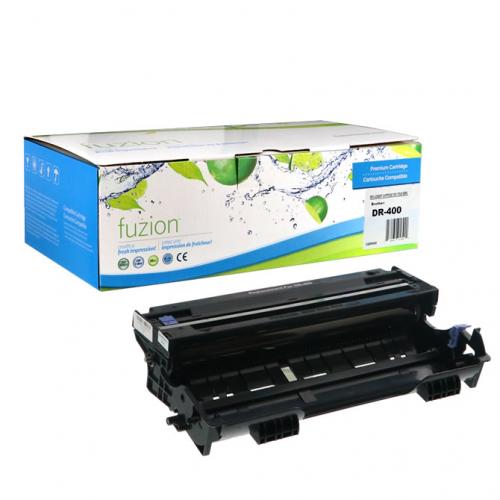


Compatible Brother DR-500 Imaging Drum – High Yield, Quality, and Cost-Effective
Are you looking for a DR-500 compatible Imaging Drum for your Brother printer? Our Fuzion HD Imaging Drum delivers exceptional print quality at a competitive price, ideal for both professional and home use.
Product Features
- Product Features : up to 20.000 pages (ISO/IEC 19752 standard at 5% coverage).
- 100% New Components : for optimal performance and easy installation.
- Color : Black
- Économique : $79.95 only $0.004 per page.
- Fast delivery throughout Canada.
- Free technical support for any assistance.
Certifications and Social Responsibility
We work exclusively with manufacturers that meet the highest standards :
- ISO 9001 : quality management ensuring reliability and compliance.
- ISO/IEC 19752 & 19798 : standardized testing guaranteeing realistic yield.
- ISO 14001 : commitment to reducing environmental impact.
- SA8000 : respect for human rights and ethical working conditions.
- We refuse to collaborate with manufacturers that tolerate forced or child labor.
- We support local education and development initiatives to prevent children from being pushed into labor.
Compatibility and Benefits
Our DR500 compatible Imaging Drum is perfectly suited for the following Brother printers:
| Brother - DCP Series |
| DCP-8020 | DCP-8025D | DCP-8025DN |
| Brother - HL Series |
| HL-1650 | HL-1650LT | HL-1650N | HL-1650N PLUS | HL-1670N | HL-1670NLT | HL-1850 | HL-1850LT | HL-1870N | HL-1870NLT | HL-5040 | HL-5050 | HL-5050LT | HL-5070DN | HL-5070N | HL-5070NLT | HL-8420 |
| Brother - MFC Series |
| MFC-8420 | MFC-8820 | MFC-8820 DN | MFC-8820D |
Order Now
Enjoy high-quality printing at a lower cost with our compatible Fuzion DR-500 Imaging Drum.
How to Reset the Brother DR-510 Drum
After replacing your Brother DR-500 drum unit, you will need to reset the drum counter so the printer correctly recognizes the new drum unit.
The reset procedure varies depending on your Brother printer model. Choose the method below that corresponds to your printer.
Option 1: Brother HL Printers Without a Display
This procedure applies to Brother printers using the DR-500 drum, including models such as the HL-5040 and HL-5050.
- Open the front cover of the printer while leaving the printer turned on.
- Press and hold the Go button for approximately 4 seconds.
- Release the button when all the indicator lights (LEDs) turn on.
- Close the front cover.
The DR-500 drum counter should now be reset.
Option 2: Brother MFC or DCP Printers With a Display
This procedure applies to Brother machines using the DR-500 drum, including the MFC-8420, MFC-8820D and DCP-8020.
- Open the front cover of the machine.
- Press the Clear/Back button on the control panel.
- The display should show “Replace Drum?”.
- Confirm the drum reset:
- if your machine has a numeric keypad, press 1;
- if your machine does not have a numeric keypad, press the Up Arrow (▲).
- When “Accepted” appears on the display, close the front cover.
The DR-500 drum counter should now be reset.
Does the “Replace Drum” Message Still Appear?
If the Drum light or “Replace Drum” message remains displayed after completing the procedure, make sure the DR-500 drum unit is properly installed, then repeat the reset procedure.
Important: resetting the drum counter does not repair a worn or defective drum unit. The counter should normally be reset when installing a new drum unit.
Need Help With Your Brother DR-500 Drum?
Not sure which reset procedure to use or whether the DR-500 is compatible with your printer? André Ink can help you identify the correct drum unit and the appropriate reset procedure for your Brother printer.
Last update on 07.10.2026
Product of the same family
Compatible Brother TN-560 Fuzion – 100% guaranteed
Compatible Brother TN-560 Toner – High Yield, Quality, and Cost-Effective A..
59.95$


Brother TN-560 / TN-570 Universal Compatible Black Toner CU028 – 6,700 Pages
One cartridge designed to replace two Brother toner references. The CU028 universal compatible b..
59.95$


Genuine Brother TN-560 Toner
Article #: OLBRTN560 Origin code: TN-560 | TN560 | TN-530 | TN530 Type: Laser cartridge Category:..
149.99$
Genuine Brother DR-500 Drum
Article #: OLBRDR500 Origin code: DR500 Type: Imaging Drum Laser Category: Genuine Capacity..
314.99$
Tags: DR-500, DR 500, DR500, DCP-8020, DCP 8020, DCP-8025D, DCP 8025D, DCP-8025, DCP 8025, HL-1650, HL 1650, HL-1650N, HL 1650N, HL-1650N Plus, HL 1650N Plus, HL-1670N, HL 1670N, HL-1670, HL 1670, HL-1850, HL 1850, HL-1870N, HL 1870N, HL-5040, HL 5040, HL-5050, HL 5050, HL-5050LT, HL 5050LT, HL-5070N, HL 5070N, HL-5070, HL 5070, HL-8420, HL 8420, MFC-8420, MFC 8420, MFC-8820, MFC 8820, MFC-8820D, MFC 8820D, MFC-8820DN, MFC 8820DN
Our customers are everywhere in Canada... Learn more
